
It’s yours.
Here is the gear list. Tap a line to change it, and the number moves.
Prices checked September 2026. The reasoning is in 01 — What You Actually Need. On paper: the one-page Build Sheet.
First video by Monday
The list was step 1. Four more, in this order. Every setting is a copy button.
00
Step 2 of 5Watch It First
One salesperson, one take, one customer. Everything in this guide is what made that video.
Nobody edited this. It was sent to one customer, by one person, in one take.
What you just watched was six live sources, cut together as it was recorded:
- The vehicle, pulled straight off the dealership’s own website.
- The salesperson on camera, talking to one customer by name.
- The dealership intro card.
- An animated map to the store.
- The nameplate across the bottom.
- Website footage of the store itself.
There was no editor. Each change on screen is a button press in a free program called OBS Studio — the same broadcast tool Twitch streamers use. The rep presses, OBS cuts, and when they stop recording, the file is the finished video.
This guide gets you that at your desk. Most of it you can do this afternoon.
02
Step 3 of 5OBS in Fifteen Minutes
Install it, set the canvas once, add your camera. That's the whole setup.
You set this up once. Nobody touches it again.
- Download OBS Studio from obsproject.com. It’s free and open source — no trial, no account.
- Open Settings → Video and set the canvas to match what your customer will see:
- Add your camera: Sources → + → Video Capture Device, pick your webcam, and drag it to fill the frame.
- Press Start Recording, say one sentence, press Stop Recording. Find the file. That’s a video.
- Press Start Virtual Camera, in the same Controls box. OBS is now a camera your CRM can pick — chapter 07 shows Chrome where to find it.
Only if you work remote — the green screen
Skip this if you’re on the floor. If you’re not, a clipped-up green blanket and one filter put you back in the showroom.
04
Step 4 of 5The Four Buttons
A scene is a finished frame. Press it and OBS cuts. Four presses and talking is a whole video.
Four buttons and talking is the only thing most dealers will actually do. So start there.
A scene in OBS is a finished frame — your camera, your nameplate, a background, arranged once. You build a handful of them, and during the recording you just switch between them. The switch is the edit.
Zero editing, and it means zero
No post. No music track. No captions to write. You stop recording, and the file on your desktop is the video you send. That’s why this gets done on a Tuesday afternoon instead of never.
The scenes Street VW runs
Borrow the names. A scene list reads like a run sheet, so name them for what the customer sees.
The key map — Stream Deck Mini, six keys
In the Stream Deck app, drag the OBS Studio → Scene action onto a key and pick a scene. Use the Record action for start and stop.
No Stream Deck? You already have buttons.
The scene list in OBS is a row of buttons. Put the OBS window next to the camera and click them. Or set keyboard shortcuts in OBS → Settings → Hotkeys — every scene has a “Switch to scene” slot. A Stream Deck is worth sixty dollars. It is not a prerequisite.
07
Step 5 of 5Send It
Tell Chrome that OBS is your camera. Your CRM records the finished video, and you send it the way you always have.
Your CRM doesn’t know OBS exists. Chrome has to be told, once.
Most reps want to record right where the customer is: inside the CRM, in Chrome. Left alone, Chrome hands the CRM your bare webcam — no nameplate, no map, no scenes. Two switches fix that. The second one you set once and never again.
1 · Turn OBS into a camera
In OBS, in the Controls box at the bottom right, press Start Virtual Camera. Whatever is on the OBS canvas is now a camera called OBS Virtual Camera, and any program on the computer can pick it.
2 · Tell Chrome to use it
Chrome won’t let a web page link to its own settings, so copy this and paste it into Chrome’s address bar:
Or click your way there: the three dots at the top right → Settings → Privacy and security → Site settings → Camera.
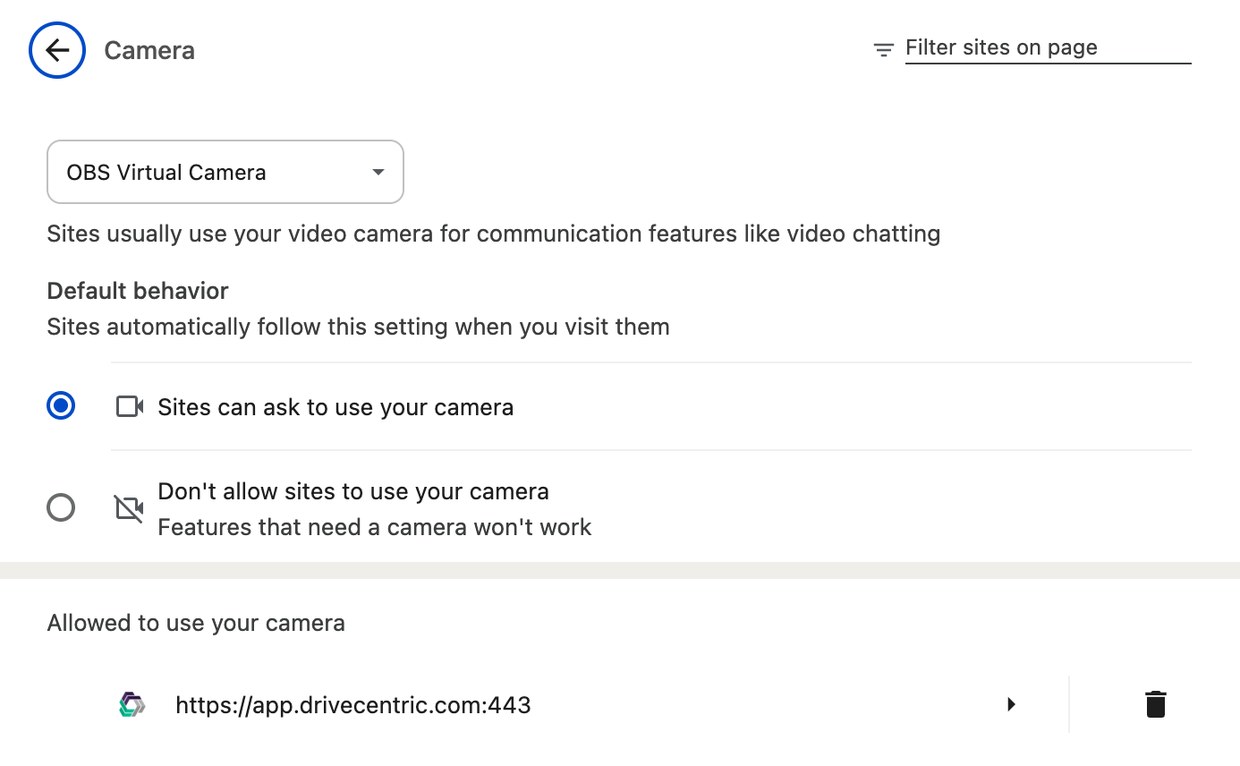
- The menu at the top lists your cameras. Choose OBS Virtual Camera.
- Leave Sites can ask to use your camera selected.
- Open your CRM and start a video. The first time, Chrome asks to use the camera. Press Allow.
At Street VW the CRM is DriveCentric. After that first Allow it shows on the same page, under Allowed to use your camera, as app.drivecentric.com.
What you should see
The CRM’s video window shows the OBS canvas — your nameplate and all — instead of the bare webcam. Press a scene button and the picture in the CRM cuts with it. Record and send from the customer’s record, the way you already do.
If it doesn’t
- OBS Virtual Camera isn’t in the menu. Start it in OBS first, then quit Chrome completely and reopen it.
- The picture is blank. The Virtual Camera isn’t running. It has to be started every time OBS opens.
- It’s still the bare webcam. The menu is back on the webcam. Choose OBS Virtual Camera again and reload the CRM tab.
- No sound. The Virtual Camera carries picture, not sound. Chrome still takes sound from your microphone, so that menu stays on your real mic:
chrome://settings/content/microphone
No video recorder in your CRM?
Then skip Chrome. Press Start Recording in OBS, and when you stop, OBS saves the finished video as a file. File → Show Recordings opens the folder. Attach or upload it from the customer’s record like any other video.
Captions
Most people watch these on a phone, often with the sound off, so captions matter. At Street VW the CRM is DriveCentric, and DriveCentric generates captions for video — right now in its mobile app, with more on the way.
This chapter tracks that. When captions reach the desktop workflow, the steps go here.
Bonus rounds, any order
Open the one you need.
01
What You Actually Need
If your store already has computers, the price of entry is zero. Here's the other number too.
The six people who do this every day at Street VW have no lights and no green screen.
They shoot on the 1080 webcams the dealership already had. The busy showroom behind them isn’t a problem to hide — people walking past is proof they’re really at the store.
| What the BDC floor already had | |
|---|---|
| A computer on the desk | have it |
| An old 1080 webcam | have it |
| OBS Studio | free |
| Click the scenes with a mouse | free |
| What Flo bought because he's vain | |
|---|---|
| Shure MV7+ microphone | $299 |
| Logitech MX Brio 4K webcam | $200 |
| Light, from Best Buy | $100 |
| Elgato Stream Deck Mini, 6 keys | $60 |
| Green screen (a blanket) | $20 |
The one thing worth buying first
A second monitor. The CRM on one screen, OBS on the other, so you watch exactly what the customer will see while you’re talking to them. That beats a light and it beats a green screen. Most BDC desks already have two. If yours doesn’t, start there.
1080 is not a compromise
The customer watches this on a phone. The finished video is 1080 either way — a 4K camera just makes a bigger file of the same thing. Don’t apologize for the webcam you have.
03
Your Sets
A set is one screen over your video. One form in, links out — your name on every video, and a map to your store.
Nothing downloads, so nothing breaks on a machine that didn’t create it.

Type your name, title and phone, add your company and logo, pick a color. It hands you back a web address. That address is your nameplate.
Open the Backlot →Then put it into OBS as a Browser Source. These settings don’t change:
Drag it above your camera in the Sources list. The nameplate slides in every time you cut to that scene — that’s what the Refresh box does.
Hire somebody Tuesday
Send them your team link. It is in the Backlot under Your lot, once you have saved your own nameplate. It opens with your company and logo already filled in: they add a name, a title and a phone, pick their own color, and get their own link. Everyone else’s link keeps working, and nobody opens OBS to change anybody else’s nameplate.
The other sets
These are the rest of the pieces from the video in chapter 00, running live with Street VW’s details so you can see them. Paste any one into a Browser Source the same way.
A map of your store
In the Backlot, open the Store map tab. Type your address, press Find it on the map, and save. You get one link for the whole team: a real map that pushes in on a big red pin with your name and address beside it. Paste it into OBS the same way. Only the map asks for an address — if all you want is a nameplate, you never see that box.
The license plate
The plate from the video in chapter 00 — the customer’s name on a license plate, rocking in the corner. It has its own page in the Backlot. Type a name, pick the look, paste one link into OBS. After that the name changes when you type it. No Photoshop, no plug-in, nothing to export.
Three ways to change the name, and none of them opens the source’s properties:
05
Talk to the Customer, Not the Camera
Eight things. None of them are acting. All of them are how you already talk to someone at your desk.
Body and face
- Hands in frame inside the first ten seconds. People are wired to want a stranger’s hands visible, and you’re asking this one to spend forty thousand dollars.
- Loose shoulders. A tense body reads as someone with something to hide — which is already what they suspect about a car dealership.
- Rest your eyes on the lens. Don’t stare at it, and don’t look past it.
- Drop your eyebrows. Raised brows and wide eyes is the face of someone who isn’t sure, and it transfers.
How you sound
- Pause instead of “um.” Half a second of silence sounds like a person who knows the car.
- End your sentences going down. Going up sounds like you’re asking permission.
- Use their name once at the top and once at the close.
- Say what the car is before you say who you are.
None of this is performance. It’s how you already talk to somebody standing at your desk. The camera is the only thing that made it weird.
06
Beyond the Showroom
The same rig, aimed at your service drive. The customer in the lane is your cheapest used car.
You already have their car in your building. You just haven’t asked for it.
Service-drive acquisition is the easiest video in the whole system, because there’s no inventory in it. You aren’t selling a car. You’re telling somebody you’d like to buy theirs. That’s why the “We want your car” overlay in chapter 03 is the starter template, not the advanced one.
What it did at Street VW
The Service Acquisitions lead source, before and after the video program — two 90-day windows, from DriveCentric:
08
Your Numbers
Two exports out of your CRM, one page back. Who delivered, and who made videos, side by side.
Your CRM already knows who sold what and who made videos. It just never shows them in the same place.
Send two standard DriveCentric exports — the monthly activity report and the delivered-deals pipeline, same date range — and you get back a two-page deck.
Page one ranks everyone who delivered a car this month by units delivered, counting a shared car as a half to each person so the total matches what the store actually delivered. Next to each name: their new and used split, videos produced, calls, texts, emails. Shaded so the leaders and the zeros are visible from across the room.
Page two is the store. Cars delivered month-to-date, the new/used share, total videos, and how many people delivered at all. Scale the dial to your monthly objective and it reads as pace, not trivia.
| Name | Units delivered | New / used | Videos | Calls | Texts | Emails |
|---|---|---|---|---|---|---|
| Marisol Vega | 18.5 | 8 / 11 | 241🥇 | 44 | 812 | 190 |
| Dale Whitfield | 12 | 5 / 7 | 96 | 130 | 604 | 121 |
| Priya Raman | 9.5 | 4 / 6 | 188🥈 | 61 | 455 | 98 |
| Tom Beckett | 7 | 2 / 5 | 54 | 210 | 390 | 76 |
| Renee Colson | 5.5 | 1 / 5 | 173🥉 | 88 | 501 | 143 |
| R. Alcaraz service | 4 | 0 / 4 | 62 | 25 | 140 | 31 |
| Kenny Ruiz | 2.5 | 1 / 2 | 0 | 96 | 208 | 55 |
Sample numbers on a made-up store, so nobody’s name is on a public page. Yours comes back with your people, your units and your objective on the dial.
What you send
Nothing to set up
No roster to maintain, no teams to define, nothing to configure. Whoever your CRM credits with a delivery appears, whatever department they sit in — which is usually how a store finds out its service or warranty people are quietly delivering cars.
The report is not a scoreboard to hang in the hallway. It is the one page that answers the question a GM actually asks about video: is the person making them also the person delivering cars?
Want this for your store?
Two ways to get it. One of them takes you ninety seconds.
I’ll run it
Pull the two exports, email them to me, and the finished deck comes back the same day — your people, your units, your objective on the dial. No charge, no call, no software. Leave your address and I’ll send you the two-line list of what to export.
Got it. Reply to the note in your inbox with the two CSVs attached and say what your objective is for the month. The deck comes back the same day.
In a hurry? Attach them to an email to flo@videoreals.com and skip the form.
Build your own
Everything the report knows is already in those two files. Here is the whole recipe, including the part that took the longest to get right.
- The pipeline is the roster. In the delivered-deals export,
Deal Sales 1is the primary salesperson. One row per car. Whoever appears there delivered a car — no list to maintain, and nobody gets left out because they sit in the wrong department. - Split shared cars. Half a unit to each name. Do it any other way and your page adds up to more cars than the store delivered, which is the first thing a GM will check.
- Add the two video columns. DriveCentric reports
Personalized VideoandCanned Videoseparately. Add them together for volume, then look at them apart once. One rep sending the same canned clip to everybody, against that same rep sending a personal one, is the most interesting comparison in the file. - Don’t drop the impersonated columns. Texts and emails sent on someone’s behalf are in their own columns. Leave them out and your BDC vanishes.
- Match names loosely. The two exports don’t agree on spelling — one prints
NOLBERTO QUEZADA, the otherNolberto Quezada Jr. Normalize case and punctuation, then match on a prefix.
A spreadsheet pivot gets you the table. The deck is a short Node script using
pptxgenjs — nothing exotic. Want it? Ask me for the script and I’ll send
it, no strings: flo@videoreals.com.